Mirai's AR Radio
News・Weather・AI・8Games・10+ More — Streamed to You
Exclusive app for Even G2 Smart Glasses
Only what you need, only when you need it — right before your eyes.



"Mirai"
News, entertainment, tools — Mirai delivers it all.
- Auto-broadcasts news and topics radio-style
- Surfaces relevant info when you start Foresight
- Hands-free voice calls via glasses mic
- Daily news digest delivered every morning









3 Display Modes
Switch easily from glasses or phone.
Use Radio / AR / Screen Off depending on the moment.

Radio
Info flows constantly. News, weather, time, and exchange rates scroll across your view

AR
Nothing shown by default. Breaking news and weather alerts appear only when they matter

Screen Off
Turn off the display and check only when needed
AI
5Mirai Live
Mirai delivers the latest news and topics
- ▸Perfect for commutes or working
- ▸Hands-free! Switches automatically like a radio
- ▸Real-time search brings you the latest topics
- ▸Tap to pause, resume, or dive deeper
- ▸Change playback speed in Settings
Foresight
Optional live assist for meetings and conversations. When started, Mirai follows the context and surfaces relevant info before you ask
- ▸Start it during meetings or conversations when you want support
- ▸Real-time search for accurate information
- ▸Great for meetings and discussions
- ▸Mirai stays quiet when not needed

Call Mirai
Chat with Mirai through the mic on your glasses
- ▸Talk to Mirai and she responds
- ▸Conversation text shows on glasses in real-time
- ▸Completely hands-free
- ▸A chat buddy while multitasking
- ▸Toggle audio on/off from your phone

Ask Mirai
Ask Mirai questions by typing on your phone
- ▸Use the input footer on your phone to send a question
- ▸Mirai searches in real-time and answers
- ▸The answer also shows on your glasses
- ▸Ask Mirai even when you can't speak out loud

Mirai's Quiz
Take on 3-choice quizzes
- ▸Scroll to pick, tap to answer
- ▸Mirai explains the correct answer
- ▸AI generates quizzes from trending topics
- ▸Dive deeper after the explanation
- ▸Even more fun with friends

Info
3News
Hundreds of articles daily checked from top world media
- ▸Every article with Mirai's original commentary
- ▸Scroll to switch between articles
- ▸Tap for auto-play! Reads through automatically
- ▸The number on ★ shows importance (★4 is breaking!)
- ▸★ in the article list disappears after reading
- ▸Read original articles from your phone


Today's Brief
Your daily news summary by Mirai
- ▸Fresh news summary delivered daily
- ▸Browse past briefs from the list
- ▸Scroll within the article to read more
- ▸A quick digest vs. full News Commentary

Weekly Weather
Check up to 7 days of weather, temperature, and more
- ▸Pick a city in Weekly Weather or Settings
- ▸Unlisted cities? Search on your phone
- ▸Weather icon appears on the home screen header
- ▸Precipitation chance included
- ▸Rain or snow alerts show automatically on the home screen


Games
8Labyrinth RPG
Roguelike RPG! 35 floors across 5 zones
- ▸Boss fights, merchants, and events with a story
- ▸Scroll to move and choose actions, tap to execute
- ▸Conquer all 5 zones to beat the labyrinth

Minesweeper
Use number clues to avoid mines and clear tiles
- ▸7 levels of increasing difficulty
- ▸Scroll up to move up, down to move right
- ▸Tap to flag, double-tap to dig
- ▸Phone "Reset" to restart the same level

Othello (Graphic)
Play against Mirai! Visual Othello board
- ▸Full 8×8 board
- ▸Scroll to choose where to place, tap to confirm
- ▸AI opponent — play anytime

Othello (Text)
Lightweight text-based Othello with animations
- ▸Fast and responsive gameplay
- ▸Flip animations included
- ▸Same rules as the graphic version

Mirai Runner
Side-scrolling run! Tap to jump
- ▸Dodge obstacles and keep running
- ▸Aim for the high score
- ▸Simple controls, exciting gameplay

Breakout
Scroll the paddle to bounce the ball!
- ▸Bounce the ball to smash blocks
- ▸Levels get harder as you progress
- ▸Compete for the best score

Block Drop
Classic puzzle! Tetris-style block dropping
- ▸Scroll to move, tap to rotate
- ▸Clear lines to score points
- ▸Compete for the best score

Shooter
Scroll to aim, tap to fire!
- ▸Shoot down enemies for a high score
- ▸Scroll to aim, tap to fire

Tools
6Schedule Alarm
Alerts on the home screen ticker at the set time
- ▸Set time, message, and repeat from your phone
- ▸Alarm scrolls across the home ticker
- ▸Handy for daily reminders

Hourglass Timer
Countdown timer with hourglass animation
- ▸Tap to pause/resume
- ▸Hourglass animation shows remaining time

Counter
Tap for +1, scroll for -1
- ▸Simple count up and down
- ▸Reset function included

Dice
Tap to roll! Scroll to change count
- ▸Roll multiple dice at once
- ▸Rolling animation included

Stopwatch
Tap to start/stop
- ▸Lap time recording
- ▸Reset to initial state

World Clock
View current time across 9 cities
- ▸Current time around the world at a glance
- ▸9 major cities covered

Points System
AI-powered features consume points. Points reset monthly.
Greatly increases monthly point limit
Phone Companion
Even G2 connects to your glasses via a smartphone app. Mirai's AR Radio runs on your phone and projects its display onto your glasses.
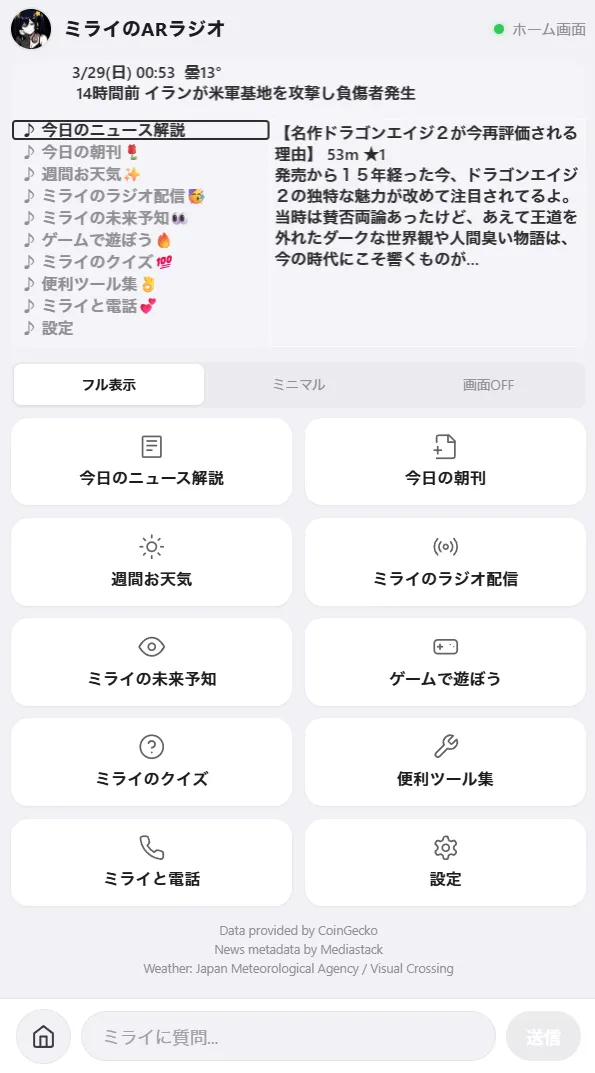
- Ask Mirai (text input)
- Open original news articles
- Search and set your weather city
- Change language, playback speed, and other settings
- Reset news read status
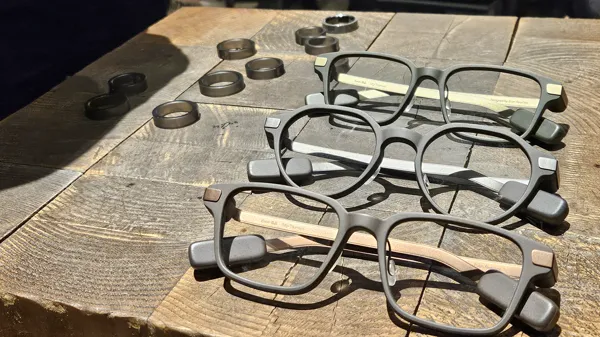
Built for Even G2 Smart Glasses
"Mirai's AR Radio" is a dedicated app for Even G2 smart glasses and the Even Ring. Lightweight and stylish AR glasses with Mirai delivering information and entertainment.
Ring Controller
Control every feature with just tap and scroll on your Even Ring